The Evolution from 2D to Geometry Arrow 3D
Geometry Arrow 3D brings the gameplay of guiding an arrow past obstacles into a three dimensional world, creating a different experience from traditional 2D games. Instead of moving across a flat surface, the arrow flies through 3D corridors filled with obstacles at different positions and distances.
One of the standout features of this version is how the 3D world shapes the gameplay. Walls, geometric blocks, and spikes have clear heights, surfaces, and outlines. Perspective adds depth to each corridor, while the forward view makes the arrow feel like it is speeding through a long tunnel. Players must watch the path ahead to find the right moment to adjust their direction.
The visuals feature bold geometric shapes and glowing colors. The arrow remains the main focus against the detailed surroundings, making it easier to follow its movement while dodging obstacles. The contrast between the path and the hazards also helps players spot dangerous areas.
In 3D space, precise movement involves more than reacting to obstacles directly ahead. Players must also judge distances, watch the direction of each corridor, and adjust the arrow's height to pass safely through narrow gaps.

Figure 1. An arrow through glowing 3D corridors
How to Play Geometry Arrow 3D
Main Goal
The goal is to guide the arrow past obstacles and reach the end of each map. The arrow moves forward automatically, so the main focus is on controlling its path rather than its forward speed.
Along the way, players must dodge spikes, avoid blocks, and move through corridors with limited space. One mistimed move can cause a collision and end the run. Remembering where obstacles appear after each failed attempt helps players make better moves on the next try.
Controls
Geometry Arrow 3D has a simple control system that works on both computers and touch devices.
- Computer: Press and hold the left mouse button to move the arrow upward, then release it to make the arrow descend.
- Phones and tablets: Touch and hold the screen to move the arrow upward, then lift your finger to make it descend.
Maps and Game Modes in Geometry Arrow 3D
Four Maps to Conquer
Geometry Arrow 3D features four maps with rising levels of difficulty. Each map asks players to adapt to different obstacle layouts and changes in the space available for movement.
- Map 1: Helps players learn how the arrow moves and how to adjust its height.
- Map 2: Requires better timing as obstacles appear in quick succession.
- Map 3: Calls for greater awareness as the path becomes more complex and more sections require precise moves.
- Map 4: Offers the toughest test, with difficult sections that demand quick reflexes and a good memory of the route.
Normal Mode and Practice Mode
The two game modes offer different ways to tackle each challenge. Normal Mode focuses on completing the map. When the arrow hits an obstacle, players must start over and find a way past the sections that caused them to fail.
Practice Mode lets players learn the route and train on difficult sections. Players can try different control methods, remember where obstacles appear, and improve their timing before returning to Normal Mode. This mode is especially useful when a corridor calls for several moves in a row.
Main Challenges in Geometry Arrow 3D
Spikes and Blocks
Spikes and geometric blocks are the main obstacles along the arrow's path. They can appear above, below, or on either side of a corridor, forcing players to find the right gap to pass through. A collision can end the run at once, so looking ahead and choosing the right path are essential.
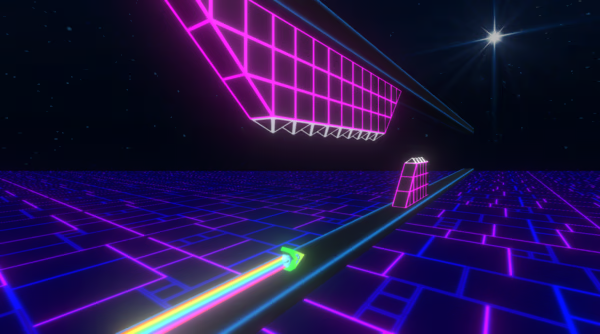
Figure 2. Fly through deep geometric tunnels
Narrow Corridors
Narrow corridors leave little room to move, making every input important. Players must keep the arrow at the right height to avoid obstacles above and below. Instead of holding the button for too long, use short, steady inputs and watch the path ahead to avoid reacting too late.
Collecting Coins
Coins add another goal beyond reaching the end of each map. To collect them, players must change the arrow's path so it passes through a coin without hitting nearby obstacles. Some situations require players to weigh the reward against the risk of leaving a safe route. Remembering coin locations after several attempts helps players plan their moves instead of reacting in a rush.
Where Can You Play Geometry Arrow 3D?
Visit polargeist.io to explore games from the Geometry Dash series and other titles with similar gameplay. The website offers options for players who enjoy reflex tests, precise controls, and browser games that challenge their ability to avoid obstacles.
Geometry Arrow 3D combines constant movement, a three dimensional world, and maps that become harder as players progress. To master the game, players must stay alert, time each move, and remember the route. Every attempt offers a chance to improve, travel farther, and take on the next challenge.