Shape Rush
 Geometry Dash 3D
 Geometry Arrow 3D
 Space Waves
 Geometry Dash Breeze 3D
 Geometry Dash Daily Level: Dream World
 Geometry Dash Demons
 Geometry Dash Wave
 Geometry Dash
 Geometry Dash Scratch
 Geometry Dash Sonic Wave
 Geometry Dash Nine Circles
 Geometry Dash Spam
 Geometry Dash Lite
 Geometry Dash Wave Challenge
 Geometry Dash Switch
 Geometry Dash Press Start
 Wave Race
 Geometry Arrow
 Geometry Dash Onward
 Geometry Dash World
 Geometry Dash Breeze
 Geometry Dash Deadlocked
 Geometry Dash Subzero
 Geometry Dash Hairless Adventure
 Geometry Dash Bloodbath
 Geometry Vibes
 Geometry Dash Meltdown
 Geometry Vibes 3d
 Geometry Dash Tidal Wave
 Geometry Dash Meltdown 3d
 Geometry Dash Lite 3D
 Geometry Dash Extrapolation
 Geometry Dash Spam 3D
 Geometry Dash Wave 3d
 Geometry Dash Subzero 3D
Shape Rush - Master the Course with Perfect Timing
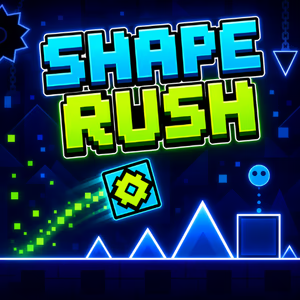
Shape Rush is a rhythm based platformer where players guide different shapes through a nonstop course filled with obstacles. One of the game's defining features is its auto-run mechanic, which keeps the character moving forward automatically. Instead of controlling its direction or speed, players must focus on timing each action correctly to avoid collisions and reach the end of the level.
The course is packed with spikes, gaps, walls, and moving traps that create dangerous situations along the way. Each obstacle requires a different response. Jumping too early or too late can send the character crashing into an obstacle. Once a collision occurs, the run ends, and players must restart the current level.
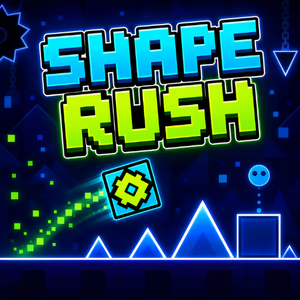
Figure 1. Play Shape Rush online and test your timing skills
Three Shapes, Three Ways to Beat the Challenges
One of the standout features of Shape Rush is its three playable forms: Cube, Ship, and Ball. Each shape has its own movement mechanics, giving players different ways to navigate the obstacles.
Cube - Jump Over Obstacles
Cube is the basic form, with gameplay centered on jumping. Players must trigger each jump at the right moment to clear spikes, gaps, and other obstacles on the ground. The distance between obstacles determines when to press the control button, making precise timing essential.
When approaching sections with several obstacles in a row, players need to look ahead and prepare for each one. Pressing the button repeatedly without paying attention to the course layout can lead to unnecessary jumps or poorly timed moves.
Ship - Control Your Flight Height
Switching to Ship brings a noticeable change in gameplay. Instead of jumping along the ground, the character flies through the air and must adjust its height to pass through narrow spaces. Holding the control button makes Ship rise, while releasing it allows the character to descend.
Ship sections require continuous control of movement. Players must alternate between holding and releasing the button to avoid hitting the ceiling, floor, or obstacles along the flight path. Holding the button in one direction for too long can make the character lose control and crash.
Ball - Flip Gravity to Change Direction
Ball introduces a different mechanic through gravity reversal. When players activate the control, the character switches between the upper and lower surfaces, creating a new way to move through dangerous sections.
To control Ball effectively, players need to identify obstacle positions and choose the right moment to flip gravity. Switching repeatedly without paying attention to the course can cause the character to hit traps or other obstacles. This mechanic requires players to remember the layout and react quickly to each situation.
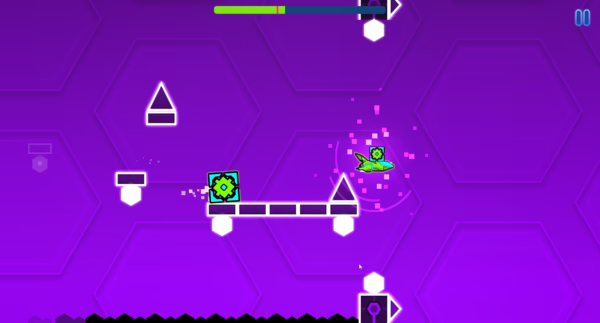
Figure 2. Guide the Cube through spikes and dangerous gaps
Explore 6 Levels with Increasing Difficulty
Shape Rush features six levels arranged across difficulty ratings from Easy to Harder. Each level has its own obstacle layout and rhythm, allowing players to gradually get familiar with the controls before facing more complex challenges.
- Dream Dash - Easy: The opening level introduces new players to automatic movement and action timing.
- Back On Track 2.0 - Normal: The challenge increases with situations that require sharper observation and more precise reactions.
- Dry Out 2.0 - Normal: Players must continue improving their control as obstacles appear along the course.
- Base After Base 2.0 - Hard: The difficulty steps up, requiring players to remember the layout and time their actions carefully.
- Reapers - Harder: This level adds more pressure with sections that demand focus and quick reflexes.
- Club Madness - Harder: The final level in the lineup continues to test players' ability to control each shape and handle obstacles.
Completing each level requires players to adapt to its rhythm and movement mechanics. When a run ends in a collision, remembering where it happened and adjusting the timing can help improve the next attempt.
How to Play Shape Rush
Shape Rush is easy to pick up, but every button press requires precision. The character moves forward automatically, so players only need to focus on controlling its movement according to the current shape.
PC Controls:
- Spacebar: Press the spacebar to perform an action.
- W: Use the W key to control the character.
- Up Arrow (↑): Trigger the character's movement.
- Left Mouse Button: Click to perform an action.
These controls let players jump, manage flight movement, or activate gravity reversal, depending on the current shape. For Ship, how long the button is held or released directly affects its flight height. Cube and Ball, meanwhile, require players to time each press based on the obstacle layout.
An important tip is to look beyond the character's current position. Watching the course ahead helps players prepare for upcoming obstacles, especially when the character switches to a different shape.
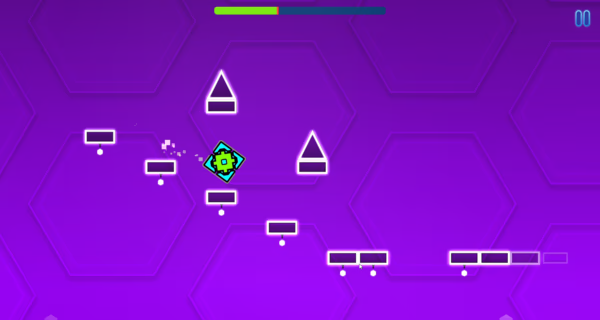
Figure 3. Dodge spikes, walls, gaps, and moving traps
How Do Music and Obstacles Work Together?
Music plays an important role in the Shape Rush experience. The rhythm is connected to the character's movement and the obstacle layout, making each run feel like a continuous journey through the beat. Instead of relying only on visual cues, players can listen to the music to recognize the pace and prepare for upcoming actions.
This combination makes navigating obstacles feel more fluid. Once players become familiar with a section's melody, they can remember when obstacles appear and adjust their actions accordingly. However, music is only a guide. Paying attention to the course remains essential when dealing with changes in shape and obstacle placement.
The fast-paced soundtrack and constant action create an energetic atmosphere throughout each level. This combination also makes Shape Rush a challenge that tests listening skills, observation, and reflexes.
Play Shape Rush Online
Shape Rush is available to play directly in your browser at Polargeist.io. No additional software installation is required to get started. The game supports both desktop and mobile devices, with controls suited to each platform.
On a computer, players can use the keyboard or left mouse button to control the character. On mobile devices, tapping the screen triggers the necessary actions during each run. With simple controls and levels that gradually increase in difficulty, Shape Rush offers a challenge for both beginners and fans of rhythm-based platformers.
Every level tests players' timing, ability to remember the course, and skill at adapting to different movement mechanics. Start with Dream Dash, get familiar with Cube, Ship, and Ball, then take on all six levels to complete the Shape Rush challenge.