Geometry Dash Retray
 Hyper Wave Trial
 Hyper Cube Challenge
 Infrunami
 On On Dash
 Slope 3
 Gaminia
 Wave Race
 Geometry Dash Wave
 Geometry Dash
 Geometry Dash Wave Challenge
 Geometry Dash Spam
 Geometry Dash Nine Circles
 Geometry Dash Press Start
 Geometry Dash Sonic Wave
 Geometry Dash Scratch
 Geometry Dash Breeze
 Geometry Dash Bloodbath
 Geometry Dash World
 Geometry Arrow
 Geometry Vibes 3d
 Geometry Dash Hairless Adventure
 Geometry Vibes
 Geometry Dash Onward
 Geometry Dash Subzero
 Geometry Dash Lite
 Geometry Dash Switch
 Geometry Dash Deadlocked
 Geometry Dash Demons
 Geometry Dash Extrapolation
 Geometry Dash Meltdown
 Geometry Dash Tidal Wave
 Geometry Dash Meltdown 3d
 Geometry Dash Spam 3D
 Geometry Dash Lite 3D
 Geometry Dash Wave 3d
 Geometry Dash Subzero 3D
 Geometry Arrow 3D
 Space Waves
 Geometry Dash Daily Level: Dream World
 Geometry Dash Breeze 3D
 Shape Rush
 Geometry Dash 3D
 No Broke Dash
 Geometry Dash Suponho
 Another Drink Dash
 Geometry Dash Slow
Geometry Dash Retray Gameplay: Switch Forms and Conquer Every Obstacle
Geometry Dash Retray is a rhythm platformer that combines obstacle dodging with different movement mechanics. Players guide their characters through multiple sections, each featuring its own way to move and avoid hazards.
0-15%: Cube - Get the Jump Timing Right
The level opens with the Cube at a relatively slow speed, accompanied by the words "8 Bit Game" to create a classic retro gaming vibe. Players jump over obstacles by pressing the button at the right moment. This section introduces the basic mechanics before the gameplay moves on to more complex character forms.
Although the Cube is easy to control, timing still matters. Jumping too early or too late can cause a collision. Getting used to the rhythm in this opening section helps players prepare for the changes ahead.
15-30%: Ship - Control Your Flight Path
After passing through a transformation portal, the Cube becomes a Ship, shifting the gameplay from jumping to controlling flight height. Holding the button makes the Ship rise, while releasing it causes the Ship to descend. Players must combine both actions to maintain the right flight path and avoid collisions.
Flashing squares add visual pressure while players navigate this section. Instead of holding the button for too long, adjust the duration of each press based on the gaps ahead. The first coin also appears in this area, encouraging players to look for positions above the usual safe flight path.
30-45%: UFO - Time Each Tap
In the UFO section, the controls change again. Each tap sends the character upward, so players must time their presses to guide the UFO through the gaps. Holding the button continuously, as with the Ship, is not the right approach here.
Obstacles are arranged to follow the music, giving players a chance to memorize the sequence after a few attempts. However, visual awareness remains essential because the distance between obstacles determines when to tap next.
45-60%: Ball - Master Gravity Switching
The Ball introduces a different movement mechanic: each press reverses gravity, moving the character between two surfaces. Players must choose the right moment to switch gravity, avoid blocks, and land in the correct position.
The second coin is located in this section, where repeatedly pressing the button can send the character off the intended path. Sometimes, leaving the controls untouched and letting the character fall under the new gravity is the better way to reach the coin. This section requires players to watch the path and understand how each press affects movement.
60-80%: Ship - Adapt to Increasing Speed
The Ship returns with noticeable speed changes. As the pace increases, reaction time becomes shorter and flight adjustments must be more precise. Holding the button too long can send the Ship too high, while reacting too slowly can lead to a collision.
To get through this section, watch the gaps ahead and adjust the flight path as needed. Consistent inputs make it easier to control altitude than prolonged presses or frequent, unplanned adjustments.
80-95%: Wave - Control Diagonal Movement
Wave is one of the sections that demands the most precise movement control. Holding the button sends the character diagonally upward, while releasing it sends the character diagonally downward. Alternating between these actions creates a zigzag path through the terrain.
At high speed, even a small mistake can cause a collision. Flashing arrows help guide the way, but players still need to time each press and release to avoid touching the surfaces. Short, controlled inputs are usually more effective than holding the button for too long.
95-100%: UFO - Reach the Heart-Shaped Finish
In the final section, the character transforms into a UFO and approaches the ending area, featuring a heart shape and the words "THANKS FOR PLAYING". This marks the end of the level and contains the third coin. Players aiming to collect every coin must pay attention to the UFO's path and the area around the heart instead of focusing only on reaching the finish.
Figure 1. Follow the beat of Golden Haze in Geometry Dash Retray
Geometry Dash Retray Controls
Geometry Dash Retray uses a simple control system, but the best approach depends on the current character form.
- Left Mouse Button, Space, or W: Jump or trigger upward movement.
- Hold the button: Maintain upward lift when controlling the Ship and control movement with the Wave.
- Release the button: Make the Ship descend or send the Wave diagonally downward.
- Z: Place a checkpoint in Practice Mode to practice a specific section.
How to Collect All 3 Coins in Geometry Dash Retray
The three coins are placed in areas that require careful observation and adjustments to the movement path. Completing the level does not automatically mean collecting all three.
Coin 1 - Ship Section
The first coin appears near the beginning of the Ship section, around the 15% mark. Players need to guide the Ship upward through the gap between the flashing squares above. If the Ship stays low on the usual safe path, the coin can be missed. Check the coin's position before adjusting the flight height.
Coin 2 - Ball Section
The second coin is located in the Ball section, around the 31% mark. After passing the first obstacle in this area, players may need to stop pressing the button and let the character fall toward the coin. This approach differs from the usual instinct to keep switching gravity while dodging obstacles, so focus on the character's trajectory rather than reacting only to the rhythm.
Coin 3 - Final UFO Section
The last coin is hidden inside the heart-shaped area near the 95% mark. As the UFO approaches the ending, watch its path and the coin's position to adjust your inputs. Don't focus only on the finishing text, as collecting the coin requires attention to the area around the heart.
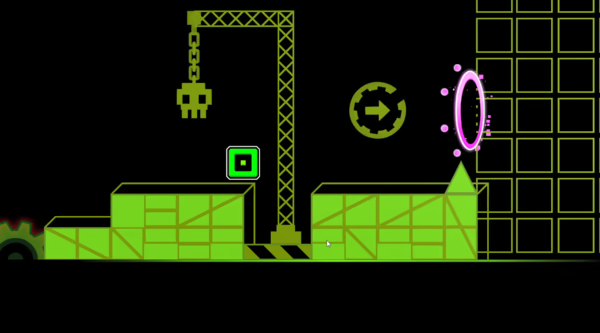
Figure 2. Hunt down all three hidden User Coinsay
Graphics and Music in Geometry Dash Retray
Geometry Dash Retray features geometric visuals built around green and black, with details inspired by classic 8-bit video games. The words "8 Bit Game" appear at the beginning, while flashing squares and directional arrows give each section its own visual identity.
The soundtrack, "Golden Haze" by Detious, works with the obstacle layout to create a sense of movement in sync with the beat. The music helps players follow the rhythm, but it doesn't replace the need to watch the path and time each input. The combination of geometric visuals, flashing effects, and music creates a consistent experience from the opening section to the heart-shaped ending.
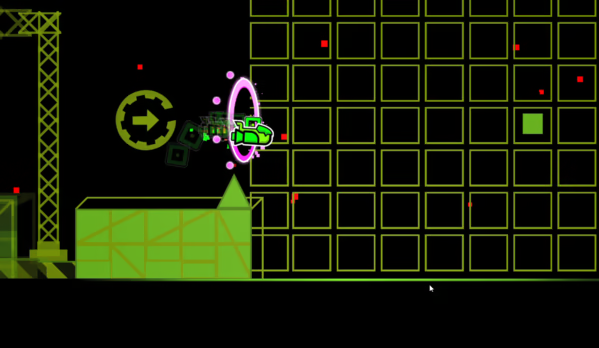
Figure 3. Step into the pixel-inspired world of Geometry Dash Retray
What Makes Geometry Dash Retray Challenging?
The main challenge in Geometry Dash Retray comes from constantly switching between movement mechanics. Players move from jumping with the Cube to controlling the Ship's flight path, timing UFO taps, switching gravity with the Ball, and managing the Wave's diagonal movement. Each mechanic requires a different response, so memorizing one fixed sequence of inputs isn't enough.
Speed changes also increase the pressure in the second half of the level. As reaction time gets shorter, players need to anticipate upcoming obstacles instead of waiting until they are right in front of them. The three hidden coins add another layer of challenge because the routes needed to collect them may differ from the safest path through the level.
See more: