Geometry Dash Slow
 Hyper Wave Trial
 Hyper Cube Challenge
 Infrunami
 On On Dash
 Geometry Dash Retray
 Slope 3
 Wave Race
 Geometry Dash Wave
 Geometry Dash
 Geometry Dash Wave Challenge
 Geometry Dash Spam
 Geometry Dash Nine Circles
 Geometry Dash Press Start
 Geometry Dash Sonic Wave
 Geometry Dash Scratch
 Geometry Dash Breeze
 Geometry Dash Bloodbath
 Geometry Dash World
 Geometry Arrow
 Geometry Vibes 3d
 Geometry Dash Hairless Adventure
 Geometry Vibes
 Geometry Dash Onward
 Geometry Dash Subzero
 Geometry Dash Lite
 Geometry Dash Switch
 Geometry Dash Deadlocked
 Geometry Dash Demons
 Geometry Dash Extrapolation
 Geometry Dash Meltdown
 Geometry Dash Tidal Wave
 Geometry Dash Meltdown 3d
 Geometry Dash Spam 3D
 Geometry Dash Lite 3D
 Geometry Dash Wave 3d
 Geometry Dash Subzero 3D
 Geometry Arrow 3D
 Space Waves
 Geometry Dash Daily Level: Dream World
 Geometry Dash Breeze 3D
 Shape Rush
 Geometry Dash 3D
 No Broke Dash
 Geometry Dash Suponho
 Another Drink Dash
 Gaminia
What Is Geometry Dash Slow?
Geometry Dash Slow is a 2D platformer that combines obstacle avoidance, character control, and coin collection on the way to the finish line. One of its standout features is the constant switching between different forms, including Ship, Mini Robot, Cube, Spider, Ball, UFO, and Wave. Each form has its own movement mechanics, requiring players to watch the path and adjust their inputs at every stage.
Stage 1: Controlling Ship and Mini Robot
The level starts with Ship, where players must guide the character up and down to avoid blue saw blades. After passing through a transformation portal, the character becomes Mini Robot. The gameplay then shifts to running and jumping across platforms, requiring precise timing based on the distance between obstacles.
Next, a Cube portal takes the character into a dark area before the transition to Spider. These changes require players to adapt to new environments and movement styles instead of relying on the same controls throughout the level.
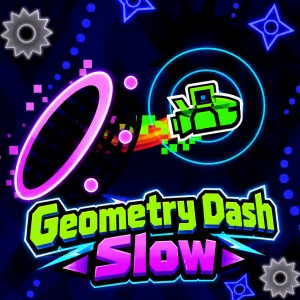
Figure 1. Jump, fly, flip gravity, and master zigzag movements
Stage 2: Gravity Switching with Spider and Ball
Spider introduces gravity switching to the gameplay. Players must change the character's position at the right moment to get past spikes and dangerous areas. Switching gravity too early or too late can cause the character to collide with obstacles along the way.
Ball continues to use gravity switching but adds large saw blades and gaps that require careful timing. Orange jump rings help players reach distant platforms. This stage also features the first coin, giving players an extra goal beyond surviving and reaching the next portal.
Stage 3: UFO, Wave, and Cube
UFO appears briefly before the character enters the Wave section. Unlike Ship, Wave moves in a zigzag pattern. Holding the control input sends the character in one direction, while releasing it changes the direction of movement. Players must control their path carefully to avoid hitting dangerous surfaces. The second coin is located in this Wave section.
When the character returns to Cube, the objective shifts to jumping over individual spikes to reach the Ship portal. This transition leads into a section where movement speed increases significantly.
Stage 4: High Speed Ship and the Final Mini Wave
The speed portal makes Ship move faster, leaving players less time to react to obstacles. Notably, some black saw blades in this section are fake hazards and do not cause damage.
The character then returns to Wave and passes through a size portal to become Mini Wave. Both the character's size and the available movement space change, making trajectory control more difficult. The black saw blades near the end are real hazards. Players must avoid them, collect the third coin, and reach the finish line.
Controls
The game uses a simple control system, but the required inputs change depending on the character's form.
- Left Mouse Button: Click or hold to jump, fly, or control movement direction, depending on the character's form.
- Space: Jump or fly.
- Up Arrow: Performs the same action as Space.
- Z: Place a checkpoint in Practice Mode.
Normal Mode vs. Practice Mode
Geometry Dash Slow offers two modes for different play styles.
Normal Mode is ideal for players who want to complete the entire level in a single run. Every collision can force players to start over, making it important to remember portal locations and obstacle patterns.
Practice Mode helps players train on difficult sections using checkpoints. Press Z to place a checkpoint and X to remove the current one. When players fail, they can continue from their saved position instead of replaying the entire level.
An effective approach is to use Practice Mode to learn the gravity switching sections, high speed Ship sequences, and final Mini Wave. Once each section feels manageable, players can switch to Normal Mode and attempt a full run.
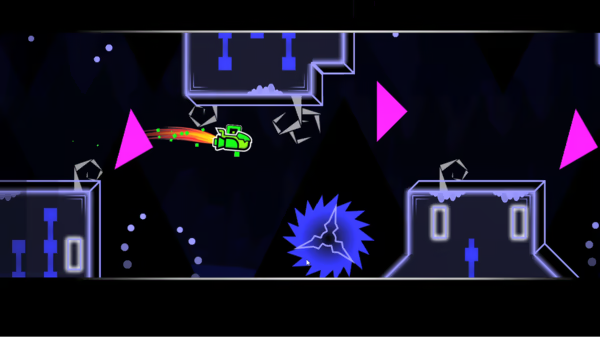
Figure 2. Learn the controls, practice tricky sections
Find All 3 Coins in Geometry Dash Slow
The three coins appear in different sections of the level, giving players an extra objective if they want to complete the challenge.
- Coin 1 - Ball: Appears during the Ball section, where players must switch gravity and avoid large saw blades. Pay close attention to the movement path and the coin's position before switching gravity.
- Coin 2 - Wave: Located in the Wave section after the UFO portal. Players must control the zigzag trajectory and avoid collisions while moving toward the coin.
- Coin 3 - Mini Wave: Appears near the end of the level after the size portal. This area contains dangerous saw blades, so players should focus on controlling their path before approaching the collectible.
The exact position of each coin and the required actions should be checked directly in the version of the game being played before following a more detailed walkthrough. Avoid risking a successful run just to collect a coin when the route is still unfamiliar.
The Hardest Parts of Geometry Dash Slow
Three sections stand out as the most challenging:
High Speed Ship: The increased speed leaves less time to react. Players need to spot obstacles early and maintain steady control.
Spider and Ball: Gravity switching requires precise timing. One wrong input can send the character straight into spikes or saw blades.
Final Mini Wave: The smaller character size and dangerous saw blades make trajectory control more difficult. This section combines a demanding control challenge with the goal of collecting the final coin.
Conclusion
Geometry Dash Slow brings a refreshing twist to the familiar rhythm platforming formula, giving players a different perspective on every jump, landing, and obstacle. Its slower movement creates more room to observe upcoming hazards, adjust timing, and plan each move carefully, while still demanding steady concentration and precise control. Every section offers an opportunity to improve your reflexes and become more familiar with the rhythm of the game. Ready to put those skills to another test? Continue your Geometry Dash adventure with Geometry Dash Polargeist, where new level layouts, challenging obstacles, and rhythm driven jumps await. Follow the beat, collect coins along the way, and push your skills further as you work toward completing the level!