Infrunami
 Hyper Wave Trial
 Hyper Cube Challenge
 On On Dash
 Geometry Dash Retray
 Slope 3
 Gaminia
 Wave Race
 Geometry Dash Wave
 Geometry Dash
 Geometry Dash Wave Challenge
 Geometry Dash Spam
 Geometry Dash Nine Circles
 Geometry Dash Press Start
 Geometry Dash Sonic Wave
 Geometry Dash Scratch
 Geometry Dash Breeze
 Geometry Dash Bloodbath
 Geometry Dash World
 Geometry Arrow
 Geometry Vibes 3d
 Geometry Dash Hairless Adventure
 Geometry Vibes
 Geometry Dash Onward
 Geometry Dash Subzero
 Geometry Dash Lite
 Geometry Dash Switch
 Geometry Dash Deadlocked
 Geometry Dash Demons
 Geometry Dash Extrapolation
 Geometry Dash Meltdown
 Geometry Dash Tidal Wave
 Geometry Dash Meltdown 3d
 Geometry Dash Spam 3D
 Geometry Dash Lite 3D
 Geometry Dash Wave 3d
 Geometry Dash Subzero 3D
 Geometry Arrow 3D
 Space Waves
 Geometry Dash Daily Level: Dream World
 Geometry Dash Breeze 3D
 Shape Rush
 Geometry Dash 3D
 No Broke Dash
 Geometry Dash Suponho
 Another Drink Dash
 Geometry Dash Slow
Infrunami and Its Unique Pencil Sketch Style World
Infrunami stands out with its minimalist geometric art style, featuring lines that resemble pencil sketches. Instead of creating a world filled with complex details, the game uses simple strokes to build the course and the objects along the way. This visual approach makes players feel like they are guiding a character through a moving sketch.
The blue cube character stands out against a soft pink background, creating a clear contrast between the player and the surrounding environment. Spikes, platforms and obstacles are scattered throughout the course, requiring players to stay alert and spot potential dangers. Glowing objects and motion effects add visual highlights while signaling areas that require interaction. The combination of soft colors and geometric elements gives Infrunami its distinctive look.
Figure 1. Every jump matters in Infrunam
Infrunami: A Challenging Journey Through Obstacles
Guide the Cube Across Dangerous Terrain
Infrunami is built around an automatic movement system. The cube keeps moving forward while players perform the necessary actions to navigate the terrain. With little time to stop and look around, every decision depends on the position and distance of upcoming obstacles.
Jumping plays a major role in getting through each section. Players must time their jumps carefully to clear spikes, cross gaps and avoid dangerous areas. Pressing too early may cause the cube to land before clearing an obstacle while reacting too late can lead to a crash. Staying aware of the terrain and maintaining a steady rhythm are essential for making further progress.
Master the Flying Sections
Along with regular running and jumping sections, Infrunami features areas where the character moves through the air. These sections introduce a different control approach, requiring players to actively manage the cube's movement rather than simply performing a single jump.
Holding or releasing the control button affects the character's trajectory. Players must adjust how long they hold the button to avoid obstacles along the flight path. Holding it for too long or releasing it at the wrong moment can send the cube away from a safe opening. This mechanic adds variety to the gameplay while testing players' observation and reaction skills.
Interact With Glowing Objects
Glowing Orbs are notable objects that appear throughout Infrunami. Their bright visual effects make them easy to spot among the geometric elements. However, they are more than decorative details because they also serve an interactive purpose in certain sections.
Players must activate these orbs at the right moment to make use of their effects while moving through the course. Approaching an orb too early or missing the interaction window can affect their ability to clear the next obstacle. Recognizing their positions and timing each interaction are important skills to develop.
Infrunami: Face a Series of Traps Along the Course
Infrunami features different types of terrain and obstacles throughout its course. Each challenge requires a specific approach, encouraging players to adapt their actions instead of relying on a single move for the entire run.
- Spikes: A familiar obstacle in Geometry Dash style games. Spikes can appear on the ground or in tricky positions, requiring precise jump timing to avoid collisions.
- Chasms: Gaps between platforms test players' ability to judge distances. Players must calculate when to jump so the cube can land safely on the other side.
- Slopes: Changes in terrain height affect how players approach upcoming obstacles. Watching the direction of movement and adjusting actions to each section are essential.
- Moving Obstacles: Objects that change position create less predictable situations than stationary hazards. Players must track their movement and choose the right moment to get past them.
- Obstacle Sequences: Multiple challenges can appear back to back, leaving little room for adjustments. Players must combine jumps and other controls smoothly to keep moving forward.
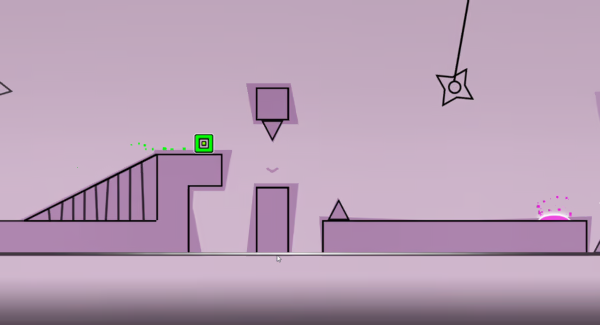
Figure 2. A small blue cube faces spikes, moving traps and dangerous gaps
Master Infrunami With Its Controls and Checkpoint System
Basic Controls
Infrunami features a relatively simple control system centered around the mouse and a few function keys. Players don't need to memorize complicated key combinations to get started.
- Left Mouse Button: Jump or control the character while flying
- Z: Place a checkpoin
- X: Remove a checkpoint
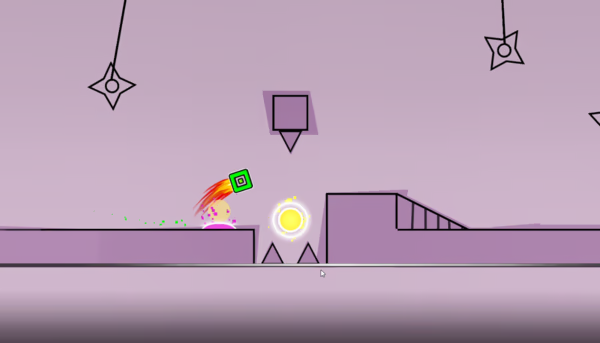
Figure 3. Flying sections and glowing orbs
How to Use Checkpoints for Practice
Checkpoints are useful for players who want to improve their skills without constantly restarting from the beginning. Instead of repeating the entire course after every failed attempt, players can place a checkpoint at a suitable location and focus on the challenges ahead.
To make the most of this feature, press Z before reaching sections with multiple obstacles or complicated movements. Then, experiment with different jump timings and control techniques to find the right approach. Each retry also provides an opportunity to remember distances, obstacle positions and when to interact with glowing objects.
Once a section becomes easier to handle, players can move on to more difficult areas. Practicing one section at a time makes learning Infrunami more manageable and reduces the pressure of tackling long sequences of challenges.
FAQs About Infrunami
What Is Infrunami?
Infrunami is a platformer inspired by the Geometry Dash style. Players control an automatically moving cube, jump across gaps, navigate flying sections and dodge various obstacles along the course.
Is Infrunami Difficult to Play?
The game can be quite challenging because it requires quick reflexes and precise timing. Beginners may struggle with obstacle sequences and flying sections. However, regular practice and the checkpoint system can make it easier to get familiar with the gameplay.
Can You Play Infrunami With a Mouse?
Yes. Players can use the left mouse button to jump and control the character during flying sections. The Z and X keys are also available for placing and removing checkpoints.
Can You Play Infrunami for Free?
Yes. Infrunami is available to play for free directly in a web browser with no additional software installation required. Simply visit the Polargeist game page to find and start playing Infrunami.